What is middleware?
Middleware is the software between two systems that do not speak the same language. It takes in data from machines, controllers and sensors, converts protocol and format and hands it to ERP, database or cloud — and the same way back. Many separate connections thereby become one place where connections are configured rather than programmed.
Definition: middleware
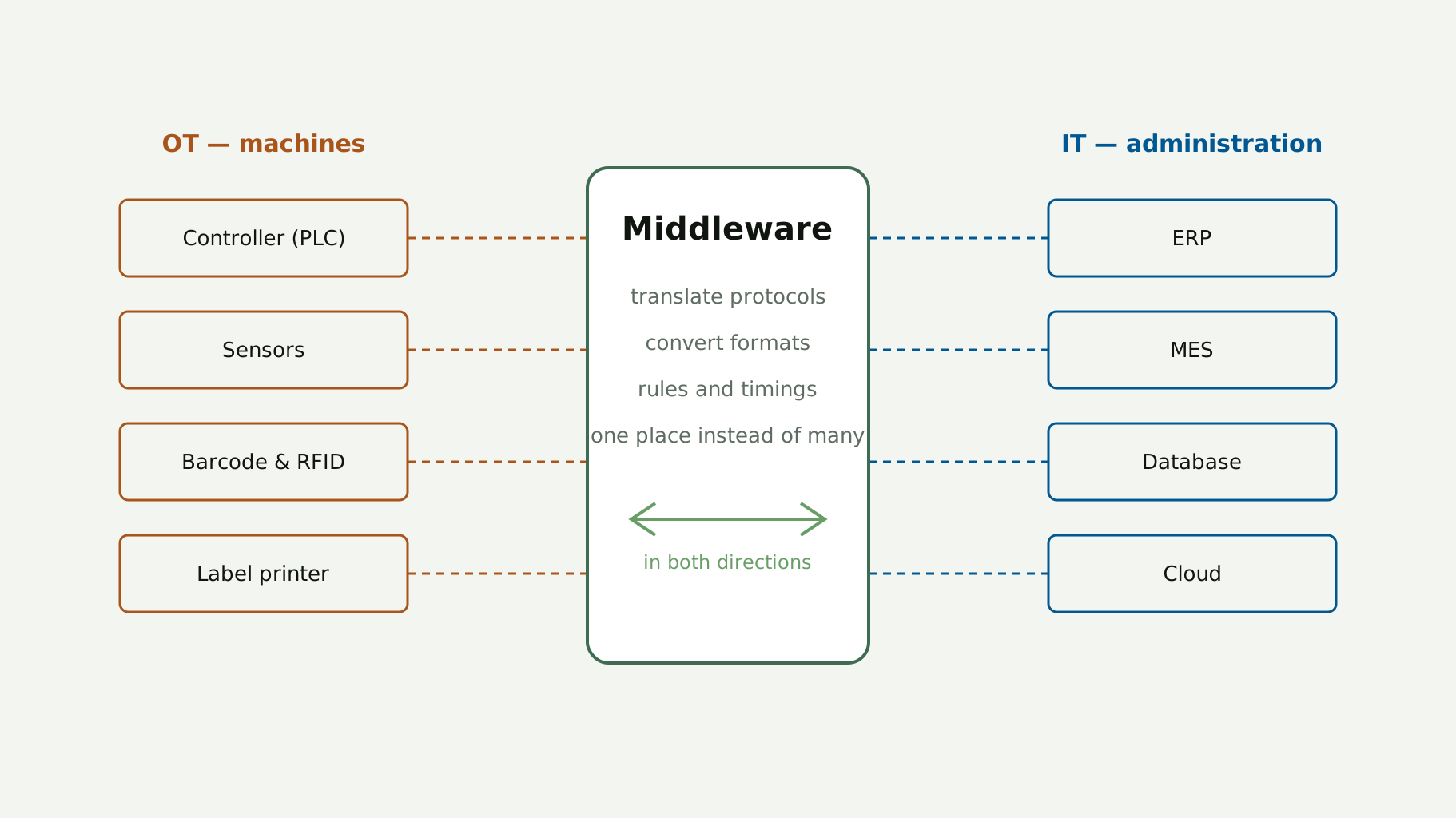
Middleware is software that connects two separate applications. In production it sits between the field level — machines, controllers, sensors — and the IT level with databases, ERP and cloud systems. It translates protocols, converts data formats and thereby makes, out of many different systems, a structure in which each can talk to each.
The connection runs both ways: values from the machine go up, orders and specifications come back to the line. That is exactly how it differs from mere data collection — a middleware does not only read along, it writes too.
What stands on either side
On the machine side stand controllers, sensors, barcode readers, scanners and label printers. On the IT side stand servers, databases, ERP and MES systems and cloud services. Both sides need a matching interface, otherwise the connection stays handwork: a person reads a value off and types it in somewhere else.
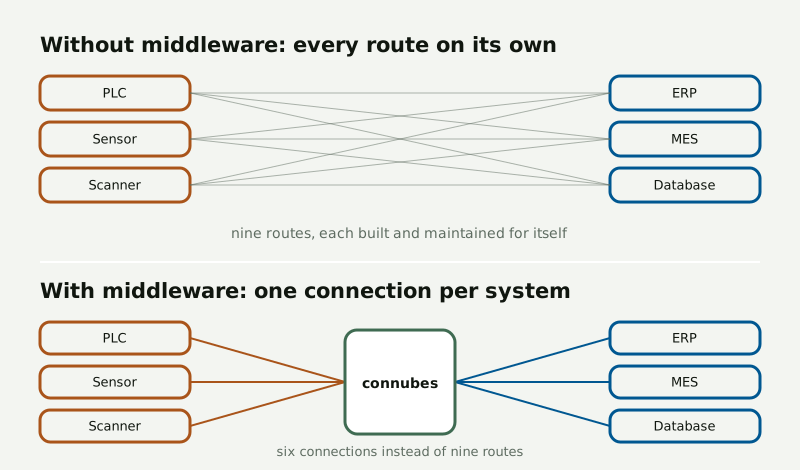
Without middleware the number of routes grows with every system. With middleware it stays at one connection per system.
The difference is not a question of aesthetics but of maintenance. Three machines and three IT systems, connected individually, make nine routes, all of which have to be built, tested and followed up at every change. Over a middleware there are six connections — one per system, whoever stands on the other side.
How a data transfer is built
Every system in a landscape is connected over the interface it already has. The middleware sees to it that each side gets the data in the format it can read — and it keeps the variety of interfaces on hand, not you.
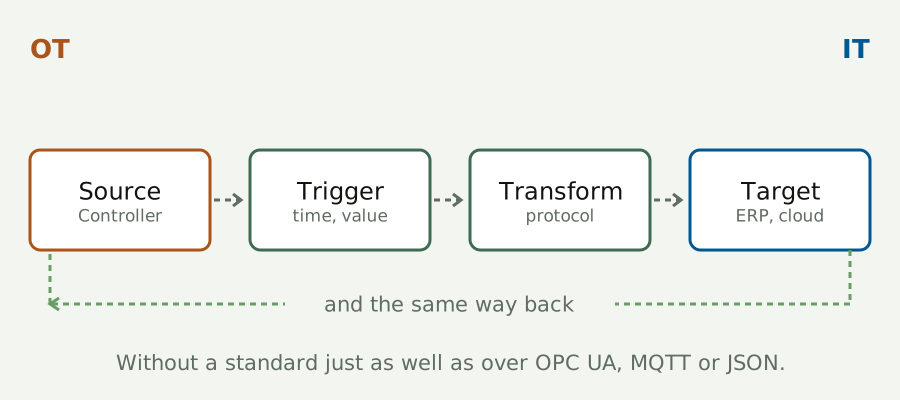
A transfer always has the same four stations — whichever systems stand at the ends.
Read the source
A value is fetched where it arises: at the controller, at the sensor, in a table. The machine is not changed for it.
Settle the trigger
When does the transfer run — on a cycle, on a value change, on an event? That decides load and how current the data is.
Transform
Protocol and format are converted, fields mapped, values calculated. Here lies a middleware’s real work.
Write the target
The target system gets the record the way it expects it — and answers, when the transfer runs both ways.
The route works with a communication standard such as OPC UA, MQTT or JSON just as well as without one — then the middleware takes over the translation entirely.
Middleware, API or protocol
The three terms are often thrown together, although they answer different questions.
| Term | Beantwortet | What that means in a project |
|---|---|---|
| Protokoll | By what rules two components speak | Sets the form, but connects nothing by itself. A middleware bundles many protocols and is therefore more mobile. |
| API | How one program addresses another | Offers similar possibilities, but takes programming knowledge — every connection is development work. |
| Middleware | How two systems work together for the long run | More variety of interfaces with no obligatory programming; the connection is configured. |
An API is not a worse route — it is a different one. Where a single, lastingly stable connection is enough and developers are working on the system anyway, it is the shorter way. As soon as there are several systems that change independently of each other, the effort moves from the first connection to maintaining all the ones after it.
What changes in operation
The source for the sister product names seven points: networking, digitalisation, automation, process optimisation, efficiency gains, process reliability and less complexity. Soberly summed up, there are three effects.
First, retyping falls away. Values that someone reads off today and enters somewhere else run automatically — at night and on the late shift as well. Second, the error rate falls, because a configured transfer does not mistype and does not forget. Third, the number of places falls where someone has to go and look when something sticks: one connection instead of many separate routes.
Two examples from production
Order data to the controller
An order sits in the ERP or in a database. Instead of copying it out at the line, the middleware hands the data straight to the controller following an agreed communication standard. Production starts earlier, and the order at the machine is the same as the one in the system.
Alarms at limit values
Machine data is evaluated continuously. If a value — a temperature, say — passes the set limit, a message goes at once to the person responsible. The intervention comes as prevention, not after the standstill.
When the landscape grows
A system landscape grows in two directions. Horizontal, when more systems come into the existing landscape — another line, a second warehouse, a further plant. Vertikal, when more computing power is needed, for instance another server for growing volumes of data.
More important than either is what happens on replacement: the core of the transfer stays the same whether components are added or exchanged. If the ERP is changed, not every single machine connection hangs on it — one side of the connection changes, not the connection itself. That is exactly what makes a middleware a decision with a long shelf life.
What a middleware has to bring with it
A middleware that depends on a quirk of its surroundings only moves the problem. Five independences decide whether it carries:
- From the network. It must not assume how the network it runs in is cut.
- From the protocols. Which language two components speak is their business — not the middleware’s.
- From the operating system. Server, virtual machine, Docker, Kubernetes: the same transfer.
- From the programming language. It has to fit what already stands in the landscape.
- From the user. It works in the background. Whoever opens a report should not notice how many parts it came from.
How you recognise a good one
Beyond independence there are five points that can be checked before choosing — and that become expensive later if they are passed over:
- Security. Where production and customer data runs, access belongs under rules and the route belongs encrypted.
- Scalability. One more system on the OT or IT side must not be a project, but a configuration.
- Variety of connections. The more protocols and systems are covered, the more rarely a special route is needed.
- Development and support. The landscape changes; the software has to go along, and somebody has to be reachable.
- Programming effort. Whoever has no development department needs an interface rather than an interface specification.
Doing it with connubes
connubes is such a middleware. Connections are configured by drag & drop rather than programmed; the extensions for it are called plug-ins, add-ons and ETL tools. The server licence applies whatever the number of clients, data points or connections running over it — so the kit grows along without the cost calculation having to be reopened at every new system.
Which systems can be connected today is on the connectors overview. What the platform changes in daily practice is shown by the use cases.
Terms in brief
- OT — operational technology
- The technology that produces: controllers, sensors, drives, test and marking equipment.
- IT — information technology
- The technology that administers: servers, databases, ERP and MES systems, cloud services.
- PLC
- Programmable logic controller — the computer that runs the machine.
- Protokoll
- The set of rules by which two components exchange data, such as OPC UA or MQTT.
- API
- An application’s programmable interface. Powerful, but it takes development work.
- ETL
- Extract, transform, load — pull values out, reshape them and pass them on in the form the target system expects.
Common questions
What does a middleware do in production?
It connects machines, controllers and sensors with ERP, database and cloud systems: it translates protocols, converts data formats and transfers values both ways — from the machine into IT and back to the line.
How does middleware differ from an API?
An API offers similar ways of connecting, but takes programming knowledge. A middleware brings more variety of interfaces and is configured rather than programmed.
Is a protocol such as OPC UA not already a middleware?
No. A protocol sets the rules by which two components speak. A middleware bundles many protocols and additionally decides which data is transferred when and where.
Do I have to be able to program for a middleware?
No. The connections are configured; with connubes by drag & drop. For cases no standard covers, there is additionally a script plug-in.
What happens if we replace a system later?
The core of the transfer stays the same. One side of the connection changes, not the connection itself — the other connections keep running.